Use Email Settings to store the reply-to identity for your broker account.
Access
Email Settings is inside the Email Templates page and is available only to Admin users.
- In the sidebar, select Email Templates.
- Select Email Settings.
Available Settings
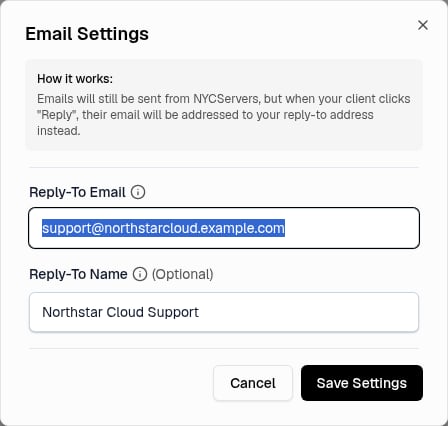 Email Settings does not include a sender name or sender address setting.
Email Address Verification
Make sure that your team owns or controls the address before you save it.
Save The Settings
- Enter an address in Reply-To Email.
- Optional: Enter a name in Reply-To Name.
- Select Save Settings.
The panel removes spaces from the start and end of each value. An empty field clears its saved value.
A successful save closes the dialog. The panel shows Email settings saved.
Select Cancel to close the dialog without a save.
Email Templates
Email Settings and Email Templates are on the same page. The reply-to settings are separate from the subject and content of each template. See Email Templates.
The configured reply-to identity applies to custom-template delivery through Resend for welcome, follow-up, cancellation warning, and cancellation emails. It does not change the sender address, broker-user notifications, invoices, reports, form notifications, support updates, billing alerts, or emails delivered by the WHMCS fallback.
The Email Settings dialog does not have a test action. A custom template has a separate Send Test Email action. That action sends the template test to the email address of the signed-in Admin with the configured reply-to identity, so you can verify the template content and reply behavior.
User Notification Controls
The stored reply-to fields belong to the broker account. Notification controls apply to each user account. Each Admin or Staff user can select the email notifications that they want to receive in Account Settings. See Account Settings.
Changing a user’s notification controls does not change Reply-To Email or Reply-To Name. Last modified on August 2, 2026